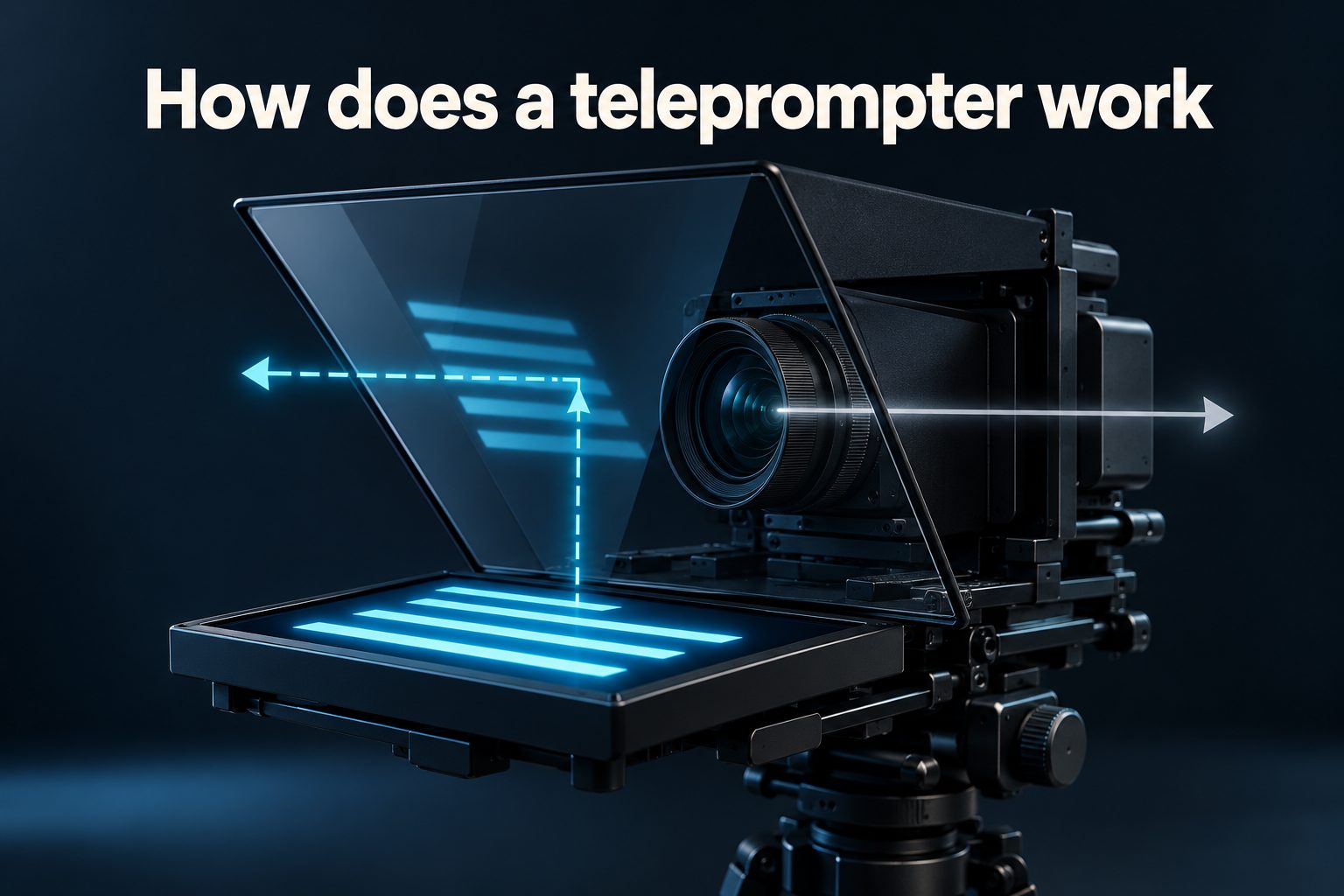
If you have ever watched a news presenter, keynote speaker, or online creator deliver a polished message while looking directly at the audience, you may have wondered, how does a teleprompter work? A teleprompter displays a moving script where the speaker can read it without noticeably looking away from the camera or audience. Traditional systems reflect text onto transparent glass placed in front of a camera lens, while simpler versions display words on a nearby screen. The result is smoother delivery, reliable wording, and more natural eye contact. However, using a teleprompter well involves more than loading a script and pressing play. The equipment must be positioned correctly, the text must move at a comfortable speed, and the speaker must deliver the words conversationally. This guide explains the technology, essential parts, setup process, benefits, practical applications, common mistakes, and professional techniques that make teleprompter presentations feel confident rather than rehearsed.
What A Teleprompter Is
A teleprompter is a device that places a written script within the speaker’s natural line of sight. It helps the person deliver prepared information while continuing to face a camera or audience.
The earliest prompting systems used printed paper positioned close to a television camera. Modern devices use electronic displays, specialized software, and adjustable scrolling controls. They range from large studio installations to compact models designed for smartphones, tablets, and laptops.
A camera-mounted teleprompter places reflected text directly in front of the lens. Because the speaker looks toward the words, their eyes also appear to look into the camera. This arrangement creates the impression of direct communication with viewers.
Presidential or conference teleprompters work slightly differently. Transparent glass panels sit on stands near the speaker. The script is reflected toward the presenter, but the audience sees through the glass and normally cannot read the words.
A teleprompter does not replace preparation or speaking ability. It is a delivery tool that supports accuracy, timing, and confidence. The strongest results come from combining suitable equipment with a well-written script, rehearsal, and natural vocal expression.
Main Parts Of A Teleprompter
Although teleprompters vary in size and design, most systems rely on several basic components working together.
- Display Screen: A monitor, tablet, or smartphone shows the script in large, scrolling text.
- Reflective Glass: Beam-splitter glass reflects the displayed words toward the speaker while allowing the camera to record through it.
- Camera Mount: A frame aligns the camera lens, glass, and display so the speaker appears to maintain eye contact.
- Prompting Software: An application controls the script, text size, margins, colors, speed, and direction.
- Controller: A remote, pedal, keyboard, or operator adjusts scrolling to match the speaker’s delivery.
- Protective Hood: Dark fabric blocks unwanted light and prevents reflections from reducing text visibility or affecting the image.
How The Teleprompter Process Works
The basic process uses reflection and careful alignment. These steps show how a camera-mounted teleprompter turns an ordinary script into readable text in front of the lens.
- Prepare The Script: The speaker or production team writes and edits the message for natural spoken delivery.
- Load The Text: The completed script is imported or pasted into teleprompter software on the display device.
- Reverse The Image: The software mirrors the text so it appears correctly when reflected by the glass.
- Position The Display: The screen is placed below or above the angled beam-splitter glass, depending on the equipment.
- Align The Camera: The camera lens is positioned behind the glass and centered with the reading area.
- Set The Appearance: The operator adjusts font size, contrast, margins, and line spacing for comfortable reading.
- Choose A Scroll Speed: The script begins moving at a pace that follows the presenter rather than forcing a fixed rhythm.
- Deliver The Message: The speaker reads the reflected words while looking through the glass toward the camera lens.
- Adjust In Real Time: An operator or remote control pauses, slows, or speeds up the text when the delivery changes.
Types Of Teleprompter Systems
Different productions require different prompting arrangements. Choosing the appropriate type depends on the camera, location, audience, script length, and level of control needed.
1. Camera-Mounted Teleprompters
A camera-mounted teleprompter places beam-splitter glass directly in front of the lens. The presenter reads reflected text while appearing to look straight at viewers. This is the standard choice for news broadcasts, training videos, advertisements, interviews, and other recorded productions requiring consistent eye contact.
2. Presidential Teleprompters
Presidential systems use one or two transparent glass panels positioned on stands beside a lectern. The speaker alternates between the panels and the audience. The setup allows a prepared speech to be delivered accurately while preserving open body language and regular visual engagement across the room.
3. Floor Or Stage Teleprompters
Floor teleprompters place large monitors near the front of a stage, often beside audience confidence monitors. Performers can view scripts, lyrics, cues, or presentation notes from a distance. These systems are valuable for live events, concerts, award ceremonies, conferences, and complex productions with multiple speakers.
4. Tablet Teleprompters
Tablet models use a tablet as the text display beneath compact reflective glass. They are portable, relatively affordable, and compatible with many professional cameras. Small production teams often choose them for corporate videos, online courses, studio presentations, and location shoots where full-size equipment would be inconvenient.
5. Smartphone Teleprompters
Smartphone teleprompters are designed for small cameras or mobile video setups. Some use one phone to display text and another to record, while others combine a reflective unit with a camera. They suit short social videos, product demonstrations, personal messages, and beginner content production.
6. Software-Only Teleprompters
Software-only prompting displays a script on a computer, tablet, or phone without reflective glass. The text usually sits close to the webcam or recording lens. This option is inexpensive and convenient for virtual meetings, webinars, and remote presentations, although eye movement may be more noticeable.
Benefits Of Using A Teleprompter
A well-operated teleprompter improves both production efficiency and the viewer’s experience. Its value becomes especially clear when wording, timing, and visual connection must remain consistent.
1. More Reliable Eye Contact
Reading text placed directly in front of the camera lets the presenter face viewers throughout the message. Strong eye contact makes recorded communication feel personal and authoritative. It also reduces the distracting downward or sideways glances commonly seen when someone reads from printed notes or another monitor.
2. Greater Script Accuracy
A teleprompter helps speakers deliver names, figures, quotations, legal wording, and technical details exactly as approved. This accuracy is important in news, regulated industries, executive communications, and public announcements. It reduces accidental omissions and prevents repeated takes caused by forgotten or incorrectly stated information.
3. Faster Video Production
Presenters who have a visible script usually require fewer restarts than those relying entirely on memory. Editors also receive longer, cleaner takes with fewer gaps and corrections. The production team can therefore spend less time recording and assembling fragmented clips, particularly when creating several videos in one session.
4. More Consistent Timing
A prepared script makes it easier to estimate and control the duration of a speech or recording. This matters when a segment must fit an advertising slot, event schedule, lesson format, or social media limit. Scrolling can also provide a steady visual guide to the intended pace.
5. Reduced Mental Pressure
Knowing the next sentence is available can reduce anxiety and free the speaker to concentrate on tone, posture, facial expression, and meaning. A teleprompter is particularly useful for inexperienced presenters or people covering detailed subjects, though rehearsal remains necessary for confident and convincing delivery.
6. Consistent Messages Across Takes
Organizations frequently need several presenters, languages, locations, or versions of the same communication. A teleprompter keeps the central wording consistent across recordings. Producers can revise the script quickly while preserving required phrases, brand terminology, calls to action, and other details that must remain unchanged.
Practical Teleprompter Use Cases
Teleprompters support many types of communication beyond television news. The following examples show how prompting technology works in everyday professional and creative settings.
1. Television And News Broadcasting
News anchors use camera-mounted systems to present frequently updated stories while maintaining a direct connection with viewers. Producers can edit scripts moments before airtime, and an operator follows the anchor’s pace. The presenter can still pause, react, or move between stories without memorizing every sentence.
2. Political And Public Speeches
Public officials often use transparent panels to deliver carefully prepared remarks while looking toward different parts of an audience. This method supports precise wording without requiring constant attention to papers on a lectern. It is especially helpful when policy details and sensitive statements must remain accurate.
3. Corporate Video Production
Executives and employees use teleprompters for company announcements, investor updates, onboarding materials, and internal training. Many of these presenters do not appear on camera regularly. Visible text gives them structure, shortens recording sessions, and helps approved business information remain clear and consistent.
4. Online Courses And Tutorials
Educators can use a teleprompter to organize lessons, state definitions precisely, and cover every required learning point. A carefully written script prevents unnecessary repetition while keeping the instructor focused on the camera. Strategic pauses can still be added for demonstrations, examples, graphics, or student reflection.
5. Social Media And Marketing Videos
Creators and marketers use compact prompting tools for product videos, short educational clips, advertisements, and brand stories. A teleprompter helps them deliver concise wording within strict time limits. The most natural results come from writing conversational sentences rather than copying formal marketing material onto the screen.
6. Live Events And Performances
At conferences, ceremonies, and entertainment events, large displays may show introductions, lyrics, names, timing cues, or emergency instructions. Presenters can recover quickly if the program changes or they lose their place. Prompting becomes a shared production tool rather than simply a device for reading speeches.
Common Teleprompter Mistakes To Avoid
The equipment may be simple in principle, but poor preparation can make a speaker look stiff or distracted. Avoiding these common problems produces a more believable performance.
1. Using An Unnatural Script
Formal writing often sounds awkward when spoken aloud. Long sentences, complicated vocabulary, and dense paragraphs make smooth delivery difficult. Write for the ear by using contractions, direct language, and clear transitions. Reading the script aloud before recording will reveal phrases that need to be simplified.
2. Setting The Speed Too Fast
When words move too quickly, the presenter may rush, lose expression, or stumble while trying to catch up. The scrolling speed should follow the speaker’s comfortable pace. Ideally, an operator or speaker-controlled remote should allow immediate changes whenever the delivery includes an unexpected pause or emphasis.
3. Displaying Text Too Widely
Wide lines force the eyes to travel noticeably from side to side. On camera, this movement reveals that the presenter is reading. Narrowing the text area keeps words close to the lens and reduces eye movement. Larger type and sensible line spacing can further improve comfortable reading.
4. Standing Too Close
A presenter positioned very close to the glass may show obvious eye movements, especially with a wide text window. Increasing the distance makes those movements less visible. The ideal position depends on lens choice, font size, framing, and equipment dimensions, so test the setup before recording.
5. Skipping Rehearsal
A teleprompter provides words but does not automatically create good delivery. Without rehearsal, speakers may emphasize the wrong phrases, mispronounce names, or sound surprised by upcoming ideas. Several practice readings help the presenter learn the message well enough to focus on communicating rather than decoding text.
6. Reading Without Expression
Following every word mechanically can produce a flat, robotic performance. Speakers should use vocal variation, facial expression, gestures, and purposeful pauses just as they would in a conversation. Marking emphasis in the script and thinking about the intended audience can make prepared language feel more spontaneous.
Best Practices For Teleprompter Delivery
Good technique makes the technology nearly invisible. These practices help a speaker sound natural while preserving the accuracy and control that prompting provides.
1. Write For Spoken Delivery
Use short sentences, familiar vocabulary, and a rhythm that matches the presenter’s normal speech. Include clear transitions so each idea leads naturally to the next. If the speaker would not use a phrase in conversation, replace it before loading the script into the prompting software.
2. Rehearse With The Equipment
Practice with the actual camera, glass, display, and controller whenever possible. Equipment rehearsal helps the speaker become comfortable with line changes and scrolling behavior. It also gives the production team time to correct reflections, alignment problems, text settings, and camera framing before the final recording begins.
3. Match Scrolling To The Speaker
The presenter should lead the delivery, and the text should follow. A dedicated operator can listen closely and adjust the scroll in real time. When working alone, the speaker can use a foot pedal or handheld control to pause and change speed without disrupting eye contact.
4. Keep The Text Easy To Read
Select a simple font, strong contrast, comfortable line spacing, and a size that remains clear at the speaking distance. Avoid filling the screen with too many words. A clean display lowers visual strain and lets the presenter concentrate on meaning, expression, and audience connection.
5. Add Helpful Script Cues
Subtle cues can mark pauses, emphasis, pronunciation, slide changes, or camera switches. These notes should be easy to distinguish without cluttering the display. Used carefully, they help the presenter coordinate spoken delivery with the production while preserving a smooth and confident performance.
6. Look Beyond Individual Words
Strong presenters read short phrases ahead instead of focusing on one word at a time. This gives them time to process the meaning and deliver it naturally. Familiarity with the script also allows brief moments of genuine expression without creating panic about losing the correct place.
Advanced Teleprompter Techniques
Once the basic setup feels comfortable, a few advanced techniques can make the speaker’s performance more flexible and convincing.
1. Adjust Margins Around The Lens
Reducing the width of the reading area keeps the presenter’s gaze closer to the camera lens. This adjustment is especially useful for close-up shots, where small eye movements are more visible. Balance narrow margins with enough words per line to maintain an easy reading rhythm.
2. Use Strategic Pauses
Add natural stopping points after important ideas rather than allowing the script to move continuously. Pauses give the audience time to absorb information and help the presenter breathe. They also create cleaner editing points if the recording later needs to be shortened or rearranged.
3. Vary The Speaking Pace
Not every part of a message deserves the same speed. Explanations may need a slower pace, while familiar transitions can move more quickly. The operator should anticipate these changes from the marked script so the display responds naturally instead of controlling the presenter’s energy.
4. Use Multiple Reading Zones
In live speeches, two prompting panels allow the speaker to shift attention across the room. The presenter can complete a phrase on one panel, look toward another audience area, and continue from the second. Deliberate transitions prevent rapid head movements that could appear distracting or repetitive.
5. Prepare For Technical Failure
Even reliable prompting systems can lose power, freeze, or display the wrong section. Keep a printed script or notes nearby, rehearse the main ideas, and agree on recovery signals with the operator. Preparation lets the speaker continue calmly while the technical team corrects the problem.
6. Review Test Footage
Record a short test and examine eye movement, posture, reflections, focus, pacing, and vocal tone. Problems that feel invisible during delivery may become obvious on screen. Small changes to distance, margins, font size, or scroll speed can significantly improve the final result.
Choosing The Right Teleprompter
The best system is one that fits the recording equipment, production environment, and people who will operate it.
- Camera Compatibility: Confirm that the frame supports the camera body, lens size, mounting position, and expected weight.
- Reading Distance: Choose glass and display dimensions that make the text readable from the presenter’s planned position.
- Portability: A compact unit suits travel and small crews, while permanent studios may benefit from larger, stronger hardware.
- Control Options: Consider whether an operator, remote, pedal, voice tracking feature, or keyboard will manage the script.
- Software Features: Look for reliable mirroring, speed control, formatting, script organization, and compatibility with the display device.
- Production Needs: Match the system to recorded video, live events, mobile content, virtual presentations, or broadcast workflows.
Frequently Asked Questions
Can The Audience See Teleprompter Text?
Normally, the audience or camera cannot see the script. Beam-splitter glass reflects the text toward the speaker while remaining transparent from the opposite side. Poor alignment, excessive screen brightness, or unusual lighting can create visible reflections, which is why testing the setup is important.
Does A Teleprompter Record Video?
A traditional teleprompter does not record video by itself. It displays or reflects the script while a separate camera captures the presenter. Some mobile applications combine prompting and recording on one device, but these are software features rather than a function of the reflective glass.
Why Is Teleprompter Text Reversed?
The display shows mirrored text because the beam-splitter glass reverses the image when reflecting it toward the speaker. After reflection, the words appear in the correct direction. Prompting software usually has a mirror mode that performs this conversion automatically for camera-mounted systems.
Can Beginners Use A Teleprompter?
Beginners can use one effectively, but they should practice before recording an important message. Starting with short scripts, slow scrolling, large text, and narrow margins makes the process easier. Rehearsal helps new users maintain expression and avoid sounding as though they are simply reading.
Can A Phone Work As A Teleprompter?
Yes, a phone can display scrolling text through a prompting application. It may be used beside a camera, attached to a compact reflective unit, or combined with another phone for recording. The small screen works best for short scripts and relatively close reading distances.
Do Professional Speakers Memorize Their Scripts?
Some speakers memorize key passages, but many use teleprompters, notes, or confidence monitors. Professionals usually learn the message and rehearse its structure rather than relying blindly on scrolling words. Familiarity lets them handle pauses, audience reactions, technical problems, and last-minute script changes more naturally.
Conclusion
A teleprompter works by placing a moving script in the presenter’s line of sight, often through text reflected on transparent beam-splitter glass. This arrangement enables direct camera contact while supporting accurate wording, steady timing, and efficient production. Different systems serve studios, speeches, classrooms, events, and mobile video creators.
The equipment delivers its best results when the script sounds conversational, the display is carefully aligned, and the scrolling follows the speaker. With suitable text settings, thoughtful rehearsal, and expressive delivery, a teleprompter becomes unobtrusive and allows the audience to focus on the message rather than the technology.